

A complete review of Flodesk
Why you should move to Flodesk
My review of Flodesk, the new email service provider, is taking the online world of internet marketing by storm. It’s easy to navigate, wonderfully intuitive, and is breaking the barriers of annoying emails. Here is Kit to Flodesk.
Note: This post has been updated in December 25 to reflect the new pricing.

In this post, I will cover why I moved from Converkit – which has been renamed ‘Kit’ to Flodesk, How much Flodesk costs, and what features Flodesk has. I’ll also cover why I think Flodesk is better than Kit for small business owners.
I recently received an email that blew my mind. It was from a fellow creative, not a huge business, just someone who wants to connect. The email looked fabulous, and not only beautiful but sexy.
I had indeed stumbled upon my first Flodesk email.
I immediately took a look. I’d been dreading my Kit bill going up to 49$ a month, so I was curious to see how much Flodesk is.
Firstly let me explain who I am and why I recommend switching to the Flodesk email service provider today.
I’m an Etsy shop owner with a small blog on the side. I have almost 1000 email subscribers. I was with Kit up until this week costing 29$ a month.
I’m not great at contacting my list. I’d rather not. As my emails just didn’t fit with my brand. I didn’t know what to say or how to engage with them. Sending that compulsory weekly email had become a bit of a chore.
But wait – I don’t have a website yet? – No problem I wrote a post on getting started with a website
Now I feel much better about sending my weekly email, and it only takes moments to compose. This is why I moved from Kit to Flodesk. If I can email my list often and with great content, it makes my life easier.
Hurry – this link won’t last for long.

Firstly, let’s look at the basics.
What is Flodesk?
Flodesk is the new email marking platform on the block. The two ladies behind the brand are Martha and Rebecca, and they are taking email marketing to a new level right now.
Flodesk is what everyone like me has been waiting for; it brings both practically and versatility to the job of email marketing. The templates look amazing on both mobile and desktop. The platform has all the same bells and whistles but without the clutter. Not only that, but it feels cleaner, less distracting and a lot less scary.

Is Flodesk better than Kit?
Read on…
What’s so great about Flodesk V Kit?
Nothing wrong with Kit. They provide an excellent steady service, they allow you to easily segment your list and have a pretty good delivery rate. But for the smaller entrepreneur who has yet to monetize their list (by this, I mean make money), it’s expensive.
I’ve managed to keep my list under 1000 subscribers because truthfully I can’t afford 49$ each month. I delete anyone who I can from my list regularly and encourage unsubscribers on every email.
But – I won’t be doing that going forward.
How much does Flodesk cost per month?
The pricing structure for Flodesk ended unlimited in December 2025. This means that you can no longer get unlimited subscribers for the same flat fee.
However,
Flodesk gives you gorgeous design, powerful automation, and simple pricing that grows with you.
The same beautiful, intuitive platform — now with flexible pricing to fit your business.
They don’t double count subscribers if they optin twice on two forms, unlike other email service providers. No confusion there.

Yes, all the Flodesk features with Flodesk offers affordable, transparent pricing that scales with your active subscriber count.
Did I mention you get all of the Flodesk features for that price?
Get 25% off your first year with my link!
Why you will love Flodesk?
I’m not going to lie to you – if you are a visual person like me, you will love Flodesk. The platform is both simple and intuitive. I love the visual emphasis that Flodesk has. Honestly, who doesn’t want to create an email that looks like it been sent from Anthropology, rather than my little kitchen table?
Since many of my readers are creatives, they too like the look and feel of Flodesk.

Find out how to create a template for your Newsletter
Which is better? Flodesk or Kit?
Let’s see.
Here is a list of reasons to love the new email marketing platform
Free email templates
These are perfect if you don’t know what to send to your list. You need inspiration and want to send something pretty in the next hour. They are pre-formatted, and all the heavy lifting has been done for you.

Upload images directly from Unspash inside the email editor.
If you don’t have any amazing images of your own to use, you can just upload them from Unsplash directly in the email editor.

All of this makes it pretty difficult to make an ugly email in Flodesk.
Does Flodesk have free Landing pages?
Yes, Flodesk has a selection of free landing pages which you can use on your blog to collect email addresses for the freebies you create.

No need to install 3rd party apps to make your landing page look fab. They are right here and made for you. Easy.

Does Flodesk have mail sequences?
Wondering what to send in your Welcome sequence, your sales sequence or even just to get to know your list. They have beautiful free templates for those.
In Flodesk you can find a number or Sequences ready-built out for you. Just add in your message, change to your branding and you are good to go.

Can you segment your list?
Yes, you can. Perfect for those of us juggling two or more different lists of sign-ups. I have Sign-ups from my Etsy shop and those who engage with my website although some appear on both eventually.
In order to Segment your list, you can create as many segments as you wish. A segment is a group of people who have something in common. They may have joined your email list from a particular optin, or clicked a link.

Can I segment my email list in Flodesk when they click a link?
Yes, this is done during a workflow, which happens when you send a series of emails to your Segments. It cannot as yet be done in a regular newsletter.

Automation is also included.
I created an email to deliver my freebie in moments and then follow on with my Welcome series. You can see how easy it is in this video.
Deliver your freebie and create a welcome series in Flodesk
Beautiful Email creation in minutes with Flodesk

Because they provide so many pretty predesigned templates, all the stress of formatting your emails is removed. You can also design your email from scratch if you prefer.
I found the process very similar to blocks in WordPress. Add a block, fill it with your text, images, or buttons, and then add another one.
All these make it one of the best tools for bloggers today.
Open rates
If you are curious about your open rates – there are statistics to help you too. My email with Kit had around a 21% open rate. Not bad. The first email I sent with Flodesk hit an 18% open rate, but those that opened clicked more and that’s what I wanted.

Open rates do tend to go up and down depending on how engaged your audience is. For example, if you send your audience a freebie and they mostly download it, chances are they will open the next email too. However, if you have not emailed your list in a long time, also known as a cold list – this will affect your open rates.
Essentially you want a clean list – of subscribers who are raving fans and open every email you send. It is better to have an email list of 3000 engaged people than an email list of 20k with an open rate of 1%.
For this reason, you should clean your list regularly.
Click here if you would like to view it in the browser

As I said before, I email my list around once per 20 days, so I’m going to use Flodesk to whip this up to once a week at least.
It gets better!
Will you write to your list more
I covered about 2hrs worth of courses that went into how to format your emails, how to improve open rates, and how to make them look pretty in Kit. What to say, how to say it.
So much so that I never actually wrote to my list. I felt my emails were so bland, and not reflective of my brand. I don’t know any CSS and felt disappointed that my emails just look a bit blah.
Each email would take me half a day to complete. It was tedious work.
I’m not sure if Kit has improved its service now.
But the future is bright!
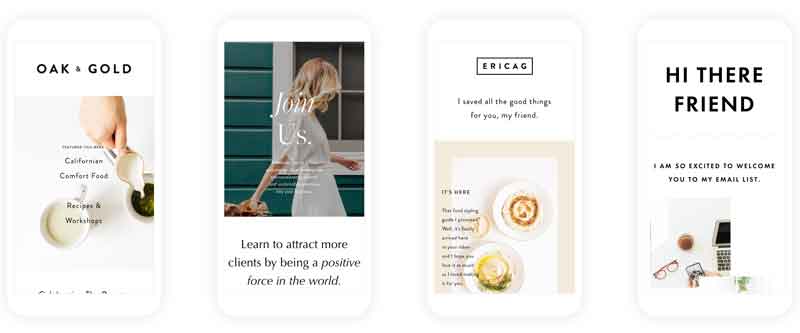
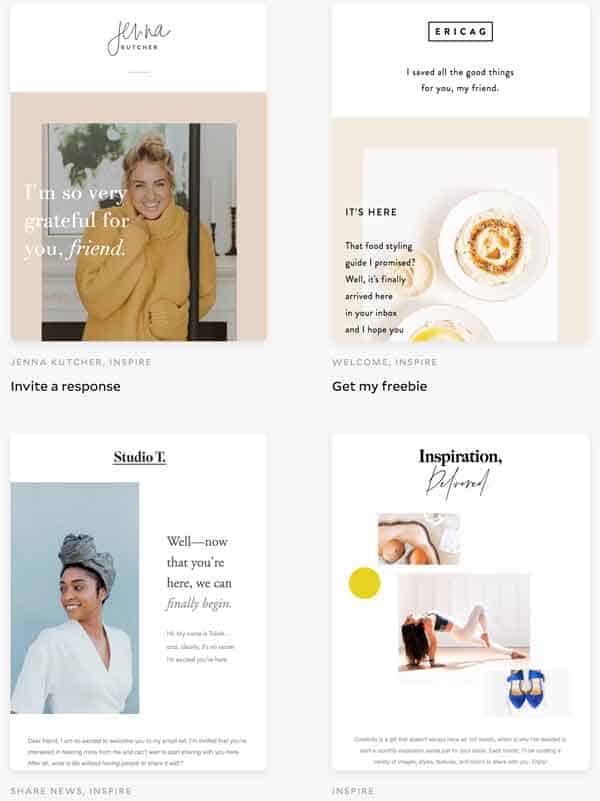
The future looks like this. These gorgeous templates are part of the free features in Flodesk.
When I have a new post on my blog, I can draft a pretty email in about 4 minutes and get it scheduled to go out the next day. This leaves me more time to produce content on my blog and keep my Etsy shop up to date.
Smiles all around. Since everyone bashes on about talk to your list, warm your list, and keep your list engaged. I’m looking forward to writing these next ones, and I have three already drafted.
This in itself is a massive weight off my mind.
I’ve probably been emailing my list around once every 20 days at best. But from now on, I can see myself improving that by a considerable amount.
I might use the same six templates for different emails and keep them consistent. Like these.
What integrations does Flodesk have?
At this moment, Flodesk integrates with Instagram, shopify, Canva, Squrespace, Wix, Thrivecart, Manychat as well as Zapier and Kajabi . Connect your shop to pull your customers into Flodesk. Once they make a purchase on Shopify, they are added automatically to your Flodesk account inside a segment. Connect your ManyChat and automatically add your emails to Flodesk too.
More integrations are being added as the platform evolves.
Can I sell items from within my Flodesk Email? Flodesk as a sales platform.
Yes, Flodesk now has a cart feature – you can sell items directly from within your flodesk email. They have a checkout page and a way for the buyer to make a payment directly from your landing page. This is a great feature because you can just add your link to the bottom of each email and let the link clicks do the business.

So what are the downsides of Flodesk?
Since writing they have been really good at ironing out the few bits customers were asking for. For example – it was quite difficult to view where sign ups were coming from. But now – you can see this in your analytics with one click.
Viewing where your sign-ups are coming from

You can filter your subscribers by date and where they originally joined your email list. You can also see where your subscribers are now and when they joined.

Individual subscriber details – say how many emails the subscriber has opened, but not which emails. Perhaps this will come later, but again – it’s not a priority for me.

What other statistics does Flodesk provide?
After sending an email – you can see some useful statistics on how well that email did with your audience.
- Email Delivery rates
- Email open rates
- Email click rates
- Who opened which links and how many times
- Who opened your email and how many times
- Opens on desktop or mobile

Is Flodesk better than Kit?
These ladies created a product that is selling itself repeatedly. They seem genuinely honest in their tactics and are graciously overwhelmed by the response to their email marketing platform.
For my needs as a small business owner, Flodesk is better than Kit.
Flodesk targets the more feminine marketers, who cannot invest lots of money in their email service provider but want good all-around service. Understanding the concept that email marketing takes time, and not everyone enjoys it. But this platform makes it pleasant.
Great ideas come to life and in a straightforward, no-nonsense way.
They have thought about the end-user and made a frustrating part of running a business into a little bit of prettiness.
Have I convinced you yet?
Don’t take my word for it – the other day these ladies managed to ‘break the internet’ with their sign-ups because everyone was jumping on board. They ran a challenge that showed us how to create those beautiful emails and send them to our list.
They even let us keep the templates inside Flodesk, if you weren’t part of it, you could still get started.
Sign up for Flodesk here.
Wondering what to include in your Newsletter?
How do I transfer my email list from Kit to Flodesk?
These are the steps I took to set up my desk account and move from Kit.
A few notes
- Flodesk used segments to group together emails from people who are interested in the same thing. In Kit, you would know this as tags.
- Flodesk uses workflows to move subscribers through an email funnel such as your welcome series or marketing funnel. In Kit these are called automatons.
- There are no rules in Flodesk. And for me, that’s a good thing because I never truly understood them.
- Forms are the same in Flodesk as in Kit. These are the sign-up forms you embed on your website to capture the email address. You can deliver your freebie, a message or redirect to another page on your site upon signing up.
How do I move my email list over to Flodesk?
This process was surprisingly straightforward, and I kept all my tags and segments which I had built up in Kit.
Note – it is easier to have both screens open next to each other so you can move from one to the other quickly.
Complete the set-up of your account
- Open your Flodesk account settings and add set up your email – you will need to verify the email you are planning to send your emails from.
- Set up the domain advanced settings. This will help your delivery rates. But it is not necessary if you want to get started. My host provider is Siteground, and I quickly followed the instructions and added the settings to my Cpanel.
- Add your brand preferences. Here you can upload your logo, so it appears automatically at the top of your emails. I was able to do this easily, but I’ve seen some who use a photograph which looked fab I must admit.
How to import Subscribers from Kit?
- Next, we want to import your current subscribers from Kit to Flodesk. Think about your tags now – are they correct, do they still make sense with your business model. If you want to change them, the name or combine them – we will cover this in a moment.
- Download a CSV file from Kit of all your subscribers onto your desktop.
- Next, navigate to the audience and subscribers in Flodesk.
- Choose – Upload a CSV file and click ok. This will have automatically created a segment of all subscribers. Hopefully, they match with the same amount in Converkit, so you know you have everyone.
- Now use your Kit tags or segments to grab another CSV file of subscribers. But this time when you upload it call it the tag or title you want it to be known as. So for mine, ‘only interested in free stuff’ – because these subscribers have previously told me that’s all they are interested in.
- I also made a segment called Library blog subscribers and Etsy shop tips as these are the tags I used when finding them in Kit.
- Continue uploading your CSV files based on your tags or segments in Kit. This will mean that some of your subscribers will appear in several segments, much like in Kit.
Note: If you use the tag in a sequence in Kit. Exclude those and come back in a few days and add them once they have completed the sequence in Kit.
Sending your first email
Use Segments to tell Flodesk who you would like to receive that email. Either add segments off your list or exclude segments. You can even add individuals also to receive this particular email.
Keep your list organized. Adding a segment of cold subscribers.
This would be a good option if you wanted to import all of your cold subscribers and send them a one-time email to get them to either stay or go.
Ok – happy that you have uploaded everyone.
let’s move on.
How do I create forms?
Forms in Flodesk range from inline, popups to whole landing pages. Just make a list of all the ones you need to replace and create them. I only use three forms on my website, so this was relatively easy to achieve.
How do I get my subscribers to receive a series of emails?
You now need to create your workflows in Flodesk. I know I thought it was going to be tedious also, but Flodesk premakes a Welcome series for you.
Just add a trigger for the sequence to begin – for example, added to the segment Etsy shop help because they signed up on your website on this form – and then build your emails below. As sign-ups enter your funnel, you can see how many have started and completed the sequence
For me, this is such a great thing to have. I must have waited almost a year before I started my email list in a way simply because I didn’t know what to tell them in the email. Enter Flodesk premade templates for Welcome sequence, nurture, sales sequence. All pre-formatted for you.
Pro Tip: Add a wait time of 100 days at the end and that way you have 100 days to add in new emails or even keep the same sequence continuing.
I have read of bloggers creating a Welcome Sequence with 60 or more emails in it – only pausing it when they have a sale to promote or something time-sensitive. So now is your chance.
Once you have created your sequence and published it – you can now add your sign-up forms to your website and check they work correctly.
My welcome sequences are relatively short at around 4-5 days. Once this time has passed, and you are happy that your recent subscribers have finished with that Welcome sequence in Kit – you can add them to your Flodesk emails using the CVS file as before.
If you add them before, they will trigger the workflow again and receive those emails too.
Lastly, get those beautiful templates working for you.
Remember if you moved because you never emailed your list or didn’t know what to say to them. Now is your chance to change that.
Use the templates and select what you would like to do with your list today. Share a story, a post, make money etc.
So we have worked on
- What is Flodesk
- How much does Flodesk cost
- Is Flodesk better than Kit
- Why is Flodesk so good at marketing automation
- How to move from Kit to Flodesk
- What features does Flodesk have – such as email templates, free landing pages
- We’ve also made some comparisons of Flodesk v Kit
I am so happy that these young ladies Martha and Rebecca were able to achieve such a smart, intuitive, easy-to-use platform in Flodesk.
I’m grateful to be one of the first adopters, and I’m sure Flodesk will do great things for the future of email marketing.
I’m certainly a lot more enthusiastic about building my email list through this brand-new email marking platform.
July 2021 update
In July I updated this post for you. Adding in the extras and new upgrades that Flodesk has added. There are more of course – but this post is quite long already. I have included the most necessary ones.
Please go for the free trial first – and spend time inside the platform to ensure it does everything that you need.
Moving on – I’ll be honest, Flodesk for a small marketer who wants to collect email addresses and email their list regularly with pretty emails, I’d say Flodesk is just the ticket. It does everything you need and doesn’t cost the earth.
Where am I now?
My email list has grown a lot recently and it would be remiss of me not to mention some of the downsides of using Flodesk.
I have almost 7000k on my email list. Most of them came from either my Etsy shop for a free print or a single sign up on my website. You see, with a list this large I really would like to send them more things which I know will interest them. I want them to be able to click a link in the email and be sent another series of emails about that topic.
How do you go about this in Flodesk?
Well, essentially you can do this once the person in a Workflow. For example – a buyer comes to my Shopify store and purchases a product, I now want to be able to target that customer with further emails suggesting other products they might like.
You may have heard elsewhere referred to as “link triggers.” The link action feature allows you to automatically organize your subscribers into segments or add them to workflows based on which links they click.
The available actions you can assign to any link in your emails include:
- Adding subscribers to one or multiple segments
- Removing subscribers from one or multiple segments
- Adding subscribers to one or multiple workflows
- Removing subscribers from one or multiple workflows
- Tagging subscribers with a custom field
A custom field is a subscriber data field that isn’t First name, Last name, or Email address. It can be data such as their geographic location, Enneagram type, Instagram handle, or wedding month.
You can add them into a sequence in Flodesk and then move them to a new email series.
Knowing whether your subscribers click your links in your emails on their desktop or mobile devices can help you optimize your email design for even greater engagement.
Concluding thoughts – Flodesk is an amazing platform, it does everything you need and more for a small business owner and within budget. I actually didn’t enjoy Kit. I didn’t really enjoy writing in the platform and it was quite confusing for a newbie.
Review of Flodesk, the new email service provider.
Please – if you enjoyed reading this article, please share it on Pinterest today.


Interested in email marketing for your Etsy shop – check out these posts for more free help.
Create a Newsletter in Flodesk
How to start an Etsy shop
How to start an email list
Ways to make money from home



Great review. I just got started with flodesk, and you have helped clarify some issues for me.
Perfect Darlene
Let me know if you have more questions.
Greetings! Awesome platform! I’m customizing my workflow now. However, I’m stuck. I can’t seem to copy and past my existing workflow content. When I right click, the paste option doesn’t appear. I understand it’s still in beta, but I’m hoping I don’t have to retype all of my workflow content!
Any suggestions?
Hello Ebony
Glad you worked it out. CtrlC CtrlV.
So glad you like it. I am enjoying how simple it is as well.
While Flodesk is gorgeous, for me, it’s lacking some of the functionality that would make migrating from CK harder. Example: only segments/tags, not both (CK is great at getting nitty gritty with both these systems) and their “landing pages” seem to be more of opt-in buttons than pages like what CK offers (more like Leadpages or SquareSpace’s Cover page than just a dressed up button). Aesthetics, their templates seem to be overly feminine, in the traditional sense, and might not work for a large audience’s branding style. Cool to read your review though!
Hi – yes I agree with that. Flodesk is in Beta still and they are working in the background to address lots of the issues you’ve mentioned.
I will say I’m not currently using any of the landing pages, but I’m saving them for my first tripwire.
I have been building my email list for some time and loved the idea of locking in for the beta pricing knowing the pressure was off to make money from my list. Yes, the templates are quite feminine, but you don’t have to use any of the templates of course, just use it like convertkit and just do pain text. Or you could just use the 30 day trial and transfer your list whilst still keeping your convertkit account active.
I hope that helps and thank you for reading my article 😊
Soooo the 50% off code keeps it at $19 forever and ever? Also, when does it expire? Hoping to get started soon, but don’t want to miss that price. Thanks!
Hi
Yes, that is correct. It is a great deal. I’m not sure when the price will change as they are still in Beta right now.
You can still do the free month and see if you like it before paying anything.
“Yes, all the Flodesk features and unlimited subscribers in perpetuity for 19$ a month.”
Unfortunately, I just found out today that this in untrue. Flodesk has gone back on their promises of the $19 beta rate. I have been using them for over a year and got slammed with a new (over double price) rate. Switching immediately…
Yes – once they came out of beta they moved it to only one year at the reduced rate. I think you still get the first year at a reduced rate – but beyond that I’m not sure.
I moved to mailerlite as I liked the idea of segmenting the list – even though I don’t use it much.
Depending on your list size of course.
Trina
I just signed up for the trial with no credit card, When do they charge you the $19? After the free trial is up? And thank you for the review. I’m just getting started and I feel I could start ahead of the game!
Hello Jen, You will be charged 19$ after the one month trial has ended, so you will be notified that your trial is finishing and then you can choose to continue, but you will need to pay going forward. Glad you enjoyed the post. During your trial, try to schedule as many emails as possible, then you get a proper feel for how many times you should contact your list. Thanks again – Trina
I just converted from Mailchimp and while most funcationality is there – it’s missing wordpress plugins for sign up forms , zapier integration and the ability to resend a campaign to those that didn’t open the last email. Those three functions are making it exremely hard to run my eCommerce business using Flodesk. So, signing up for the $19 a month to get locked in to the price is fab. But I’ll need to keep my mailchimp going until these things are included.
Hello Trista
Thank you for your comment. From the Facebook group the beta testers for Zapier has begun so hopefully it won’t be long. The ability to resend a campaign to those who didn’t open the first time – yes, I am waiting this also.
Of course, we would like all the things, but I believe the price is still great for small businesses. It’s perfect for my needs, but yes, if those functions make a significant difference to your bottom line, I would also keep my mailchimp running.
That said – I do believe that the price reflects the fact that Flodesk doesn’t yet have all integrations. But when it does, it will be at least the same price as CK.
I hope that helps – Trina
Hello!!! Love this post! Im struggling with Mailchimp because my list grows every week by 200 people. So, In mailchimp after paying nothing I started to pay 29 USD, then a month after 39 USD. It is too much money for a list astill need to monetize. Do you know if is easy to migrate from Mailchimp to flodesk? Any place where i can read about it? I cannot find any other page in Flodesk but the one to suscribe. Thanks again 🙂
Hello
Thank you for your comment.
If you can download a CSV file of all of your subscribers on Mailchimp, then you can easily upload them to Flodesk.
If your list is segmented with subs coming in from several sources- then download those again in separate csv files.
You will need 1 file with ‘all subs’ and several others with segments.
You can easily upload these to Flodesk in minutes.
I hope that helps
https://youtu.be/GuWCHkYbStk
Trina
I’m intrigued! ….I used your link but when trying to set up a test email it doesn’t appear that I can take an html and directly insert it. Even from the ‘text’ option, it doesn’t show up correctly. The same html will show up correctly if I insert when using my current ESP (Madmimi). Am I mistaken when I say this can not be done?
Hello – I’m not familiar with Madmimi so I’ve never tried to insert HTML into an email. I usually draft my emails on the fly – or I’d write them in Google docs and copy them over to the email template I’m using. You could contact the help desk and see, or join the free Facebook group for Flodesk and ask your question in there. https://www.facebook.com/groups/flodesk/
Thanks Trina! I am finally starting my website/mailing list and was teetering between Convert kit and flodesk but the affordability of FloDesk won me over, thanks to your summary and link! 😉
Hello Carrie,
I’m pleased you found the article helpful and decided to join Flodesk. With regards to starting out, it’s important to keep the costs low, but I also think Flodesk is more suited to new website as well. They are very helpful and I’ve seen them grow in the right direction in a short time. Good luck and do let me know if you need help. Trina
Hi Trina,
I am so glad I found this post and want to thank you because I was in the market for a new email provider for my biz. I set up a test account in ConvertKit and was leaning towards it for the low cost but was underwhelmed by the plainness across the templates. Then, I found your post about Flodesk and ta-dah, it’s perfect for my visual creative vibe. So, I went through your link and registered for an account. And it costs less than the other platforms I’ve seen, win win! I’m so excited to send out next week’s email to my newsletter list. Thanks SO much for your help!
Thank you Laura,
I’m so glad you found it helpful. I will update this post with new functions on Flodesk as they have lots more now. Thank you again for using my link and taking the time to comment.
Trina
We’ve been considering a move from Klaviyo to Flodesk for 6 months now. We dread using Klaviyo, TBH! It’s overwhelming and UI is outdated. Your article made the decision easier for us. We’re going to transition! Using your link this week to give you the credit for all the work you’ve put into this article. Thank you!
Thank you – I’m glad you found the information helpful. Please do use all the options during your trial to ensure it fits your needs before making a commitment. I hope you like it.
Thanks again
Trina
Hello Andre,
Thank you for your comment. Possibly you are right, but the article is aimed at new email lists – not necessarily those with very large email lists. With a large email list, it’s always a good idea to shop around.
Trina
Hello, I’m a new user of Flodesk and my tested the trial period. I sent out a newsletter (for my client) but after 24 hours the links I added expired. Why is this so?
Hello Jan
I’ve not heard of this before. Maybe shoot them a quick email to support at Flodesk.